Destination Travel
Report Parameters
|
Field |
Description |
|---|---|
|
Report Name |
The name of the report. |
|
Report Options |
Available options include the following:
|
|
For |
The date for which the report must be generated. |
|
Provider |
A drop-down list consisting of all the transportation providers. Users can select multiple or all the providers from the list to be displayed in the report generated. |
|
Booking Code |
A drop-down list consisting of all the booking codes. Users can select multiple or all the booking codes from the list to be displayed in the report generated. |
|
Assigned Trips Only |
When enabled, the system will include only assigned trips in the report. |
|
Include Itinerary on printed report |
When enabled, the system includes itineraries in the report. |
|
From |
The time from when the data must be considered for generating the report. By default, it is 12:00 AM. On choosing From time, the option to choose To time will be enabled. |
|
Type Of Trip |
Available options include the following:
|
|
Include All Round Trips |
When enabled, the system includes all round trips in the destination travel report. |
|
Transport Status |
Available options include the following:
By default, the All option is enabled. |
|
Sort By |
Available options include the following:
|
|
Include Comments |
When enabled, the system includes comments in the report. |
Sample Report
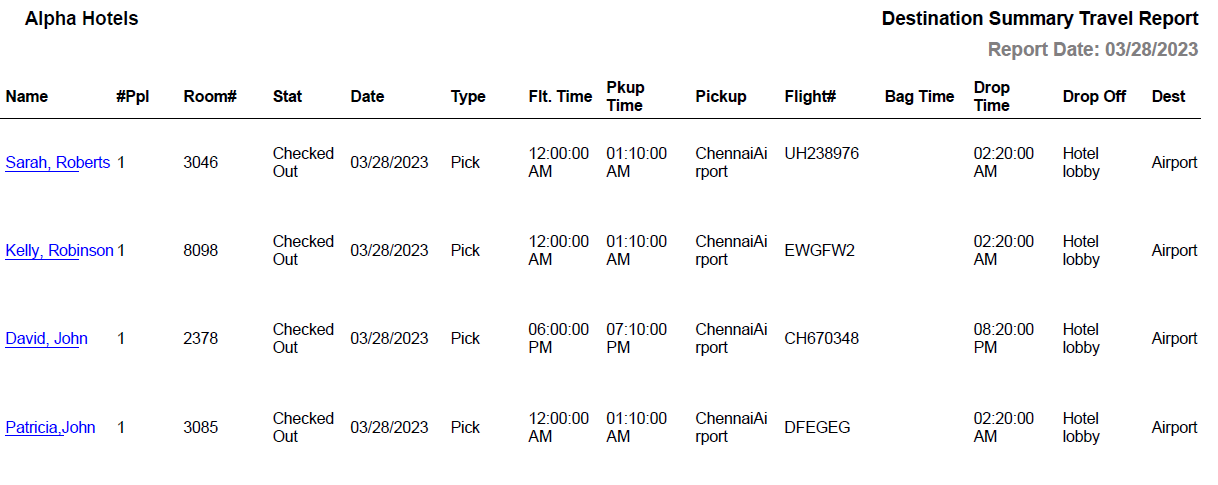
Report Fields
|
Field |
Description |
|---|---|
|
Name |
The last name and first name of the guest will appear as a hyperlink and clicking it will navigate the user to the guest record. |
|
#Ppl |
Number of guests on the reservation. |
|
Room# |
The room number of the guest. |
|
Stat |
The status of the booking. |
|
Date |
The date for which the booking has been made. |
|
Type |
The type of trip. The type includes the following:
|
|
Flt.Time |
The time of arrival/departure of the flight. It depends on the type of trip. |
|
Pkup Time |
The time at which the guest must be picked up. |
|
Pickup |
The place from where the guest must be picked up. |
|
Flight# |
Flight number. |
|
Bag Time |
The time at which the bags will be collected by the guest. |
|
Drop Time |
The time at which the guest will be dropped at the destination. |
|
Drop Off Dest |
The place where the guest must be dropped. |